
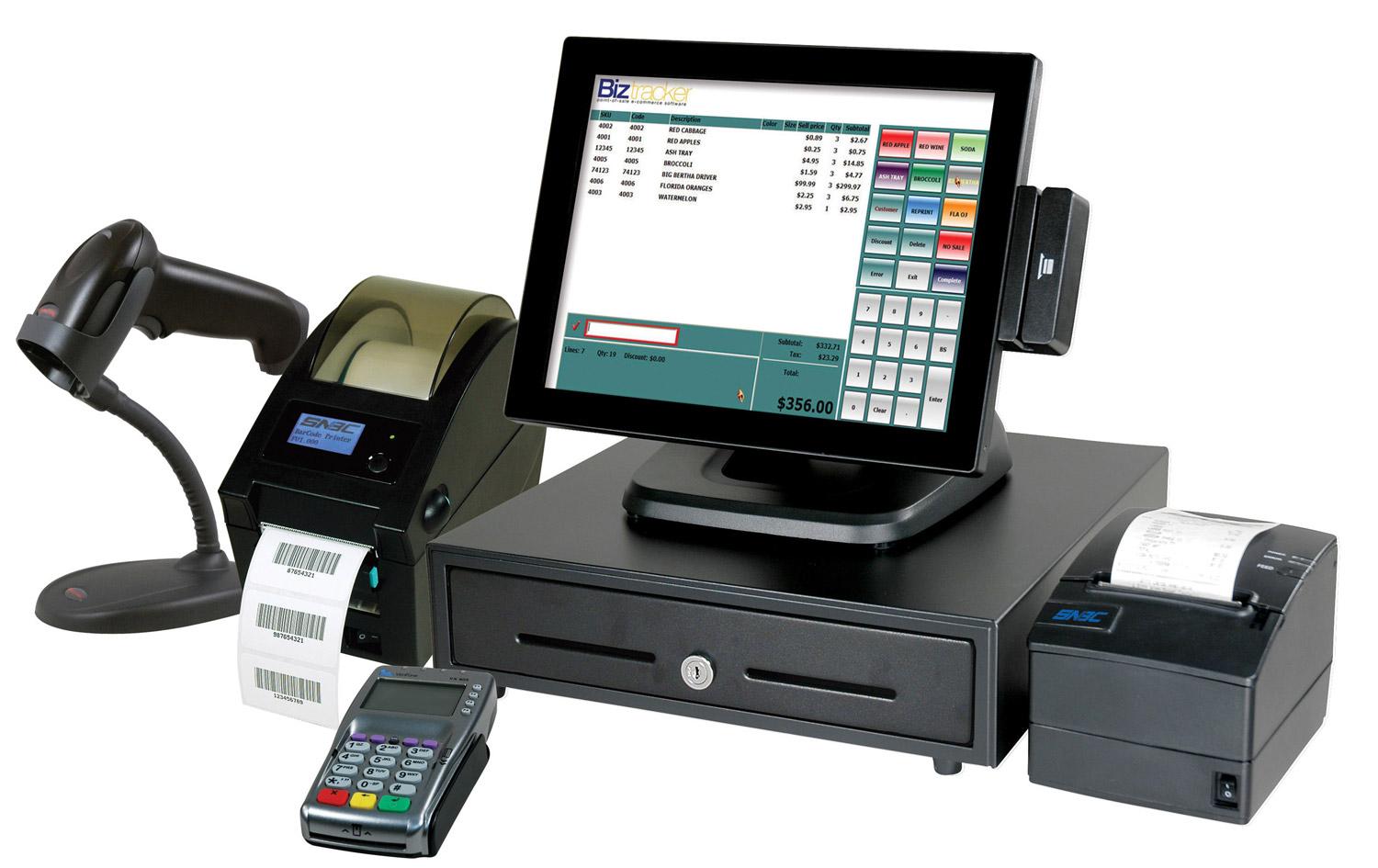
1. Introduction: Why POS pricing varies.
First things first…a typical POS System comprises of Hardware and Software.
POS Hardware is basically the machines used to run a POS.
POS Software is the program or application itself.
The cost of a Point of Sale (POS) system varies from one provider to another because not all POS solutions offer the same features, capabilities, level of support or business value.
What’s most important is that you should consider both the COST as well as QUALITY of the POS Systems that you choose.
Because POS Systems are a long-term investment and touch on critical operations, you should not compromise on quality.
2. What makes up a complete POS system?
A complete POS System setup depends mostly on the type of business.
For example, a typical retail store must have a barcode scanner…whereas a restaurant doesn’t need a scanner.
Depending on the business, a POS system may require:
- POS Touchscreen Terminals.
- Desktop Computers
- Receipt printers.
- Barcode scanners.
- Cash drawers.
- Customer display screens.
- Weighing scales.
- Label printers.
- Handheld POS Devices
- Network equipment.
3. Types of POS Touchscreen Terminals.
- All-In-One POS Touchscreen
- Windows POS Touchscreen Terminals
- Android POS Touchscreen Terminals
- Mobile/Handheld POS Terminals
- Tablet Based POS Terminals
4. Cost of receipt printers and barcode scanners.
Receipt printers and barcode scanners are two of the most common hardware accessories used in POS installations.
Although they may appear to be relatively small components of a POS system, their quality, specifications and functionality can significantly influence the overall implementation cost.
The good news is that these devices are available at different price points, making it possible for businesses of different sizes to choose equipment that suits their operational needs and budgets.
Receipt Printers
A receipt printer is used to print transaction receipts, providing customers with proof of purchase and helping businesses maintain proper transaction records.
There are two common types of receipt printers:
- Thermal Receipt Printers
- Mobile Receipt Printers
Which receipt printer should you choose?
For most Kenyan retail businesses, an 80mm thermal receipt printer with USB connectivity is a practical choice. Businesses operating multiple tills may benefit from Ethernet connectivity, while restaurants may require additional printers for kitchen order processing.
Barcode Scanners
A barcode scanner is a device used to read product barcodes and automatically transfer the information into a POS system.
Instead of manually searching for products or entering product codes, employees simply scan the barcode, and the POS retrieves the corresponding product details and selling price.
This improves checkout speed, reduces manual errors and makes stock management easier.
- Wired Handheld Barcode Scanner
- Wireless Barcode Scanner
- Table-mount/Desktop/Omnichannel Barcode Scanner
5. Cost of cash drawers and other accessories.
A cash drawer is a secure compartment used to store cash received from customers during sales transactions. It is commonly connected to a receipt printer or POS terminal and can open automatically when a cash transaction is completed.
Types of cash drawers
- Standard Electronic / Automatic Cash Drawer
- Manual Cash Drawer
What determines the price?
- Construction material and durability.
- Number of compartments.
- Electronic or manual operation.
- Locking mechanism and security features.
- Compatibility with POS printers and terminals.
6. POS software costs and licensing considerations.
POS software licensing refers to the terms under which a business is permitted to use a POS application.
Depending on the provider, a business may pay:
- A one-time software purchase or license fee.
- A monthly subscription.
- An annual subscription.
- A license fee per computer or POS terminal.
- A fee based on the number of branches or users.
- Additional charges for advanced features or integrations.
Some providers combine software licensing, installation, training and technical support into one package, while others charge for these services separately.
A. One-time license payment
The business pays once for the right to use a particular software version under the provider’s license terms.
Advantages:
- No recurring subscription for the licensed version, where applicable.
- Easier to budget for the initial software purchase.
- May be suitable for businesses preferring upfront ownership-style payments.
Considerations:
- Upgrades may attract additional charges.
- Technical support may be billed separately.
- The license may restrict the number of devices or installations.
- A one-time fee does not necessarily mean perpetual use or free future upgrades.
B. Monthly subscription
The business pays a recurring monthly fee to use the POS software.
Advantages:
- Lower initial financial commitment.
- May include updates and technical support.
- Flexible for businesses that prefer operating expenses.
Considerations:
- Recurring costs accumulate over time.
- Access may be restricted when subscriptions expire.
- Some advanced features may require higher subscription tiers.
C. Annual subscription
The business pays for software access annually.
Advantages:
- Easier annual budgeting.
- Some providers offer discounts compared with monthly payments.
- May include annual updates and support.
Considerations:
- Requires an upfront annual commitment.
- Renewal costs should be considered.
- Businesses should understand what happens when the license expires
7. Complete POS packages versus buying individual components.
A complete POS package is a combination of hardware and software components assembled to provide a business with the essential tools for processing sales and managing transactions.
Buying individual POS components means purchasing each piece of equipment separately instead of selecting a preconfigured package. For example, a business may purchase a touchscreen terminal from one supplier, a receipt printer from another supplier and a barcode scanner from a different vendor. The business then assembles the components into a working POS environment.
Choosing the right POS equipment involves more than simply purchasing a touchscreen computer, printer or barcode scanner.
Businesses need equipment that works together reliably and supports their daily operations.
MaxPOS provides POS hardware, software, accessories and business technology solutions to support different business environments.
Whether you need a complete POS package for a new business or individual components to upgrade an existing system, MaxPOS can help you identify suitable equipment based on your requirements and budget.
8. Factors to consider before purchasing.
Choosing a Point of Sale (POS) system is an important investment for any business. The right system can improve sales processing, stock management, employee accountability, customer service and overall business performance.
However, not every POS system is suitable for every business. A system that works well for a small retail shop may not meet the operational requirements of a supermarket, restaurant, hotel or wholesale business.
Before investing in POS hardware and software, business owners should evaluate several factors to ensure they select a solution that delivers value, meets their operational needs and supports future growth.
Here are the most important factors to consider.
- Understand your business needs.
- Cost and Total Investment
- Ease of Use and User-Friendliness
- Hardware Compatibility
- Stock Management Capabilities
- Reporting and Analytics
- User Access Control
- Integrations such as MPESA, KRA ETIMS, Banks etc
- Scalability
- Technical Support and Warranties
Selecting a POS system should be a carefully considered business decision. The right combination of hardware and software can improve operational efficiency, strengthen internal controls and provide better visibility into business performance.
9. Why buy your POS equipment from MaxPOS?
When buying POS equipment, look beyond the initial purchase price. Consider product suitability, compatibility, convenience, reliability and the support available from your supplier.
MaxPOS aims to make it easier for Kenyan businesses to source the POS equipment they need, whether they are setting up a new workstation, replacing existing hardware or expanding their operations.
MaxPOS aims to help customers identify equipment that meets their business requirements, rather than simply purchasing hardware based on appearance or price
At MaxPOS, the focus is on helping Kenyan businesses access the right POS equipment and solutions to support their daily operations and future growth.
